Microsoft 365 Global Outage: Causes, Impact & IT Response
Learn what caused the November 2026 Microsoft 365 outage, which services were affected, and how IT leaders can monitor service health and maintain operations.
Key Takeaways
- The November 2026 Microsoft 365 outage affected multiple cloud services. Exchange Online, Outlook, Microsoft Teams, Copilot, and Intune experienced varying levels of disruption across several geographic regions.
- Infrastructure capacity problems contributed to the disruption. Unexpectedly unavailable servers increased pressure on remaining systems, creating connectivity challenges and complicating recovery.
- Microsoft reported no indication of malicious activity. The disruption illustrates why IT teams should distinguish cloud-provider outages from cybersecurity incidents before taking corrective action.
- The Microsoft 365 Service health dashboard provides detailed incident information. Administrators can review active incidents, affected services, recovery updates, and configure service-health notifications.
- Business continuity planning must address provider-wide cloud failures. Organizations should identify critical Microsoft 365 dependencies, establish alternative communication methods, and prepare for interrupted workflows.
- Cloud resilience requires more than service monitoring. Documented continuity procedures, employee communications, and recovery planning help organizations maintain essential operations during widespread disruptions.
Microsoft 365 Global Outage: What Happened and What IT Leaders Should Do Now
A major Microsoft 365 outage has disrupted business operations worldwide, leaving organizations struggling to access email, manage meetings, and use essential cloud applications. The incident highlights a critical challenge for IT leaders: Even the most established cloud platforms can experience widespread failures that interrupt business operations.
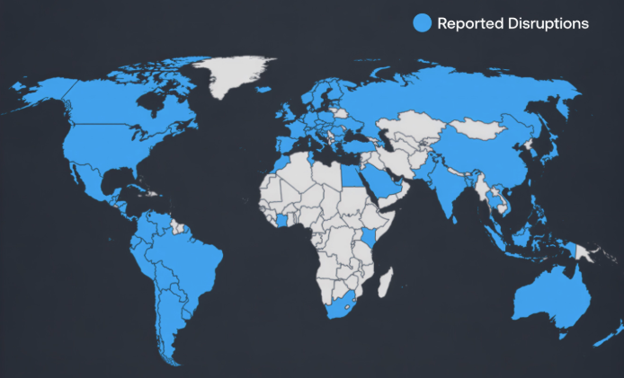
The disruption began Thursday, November 12, 2026, and continued into Friday, affecting organizations across North America, Europe, Asia, and other regions. Microsoft reported improving conditions Friday morning, but some users continued experiencing connectivity problems and delayed email delivery.
For CIOs, CISOs, and IT directors, the immediate priority is understanding which services are affected, communicating with employees, and maintaining essential operations while Microsoft restores service.
What's Happened During the Microsoft 365 Outage So Far?
The disruption originated within Microsoft's cloud infrastructure, with Exchange Online experiencing significant connectivity problems. Users encountered difficulties opening Outlook, accessing mailboxes, and sending or receiving messages.
The impact extended beyond email because numerous Microsoft 365 applications depend on shared infrastructure and interconnected services.
Affected capabilities included:
- Outlook and Exchange Online: Mailbox access failures and delayed email delivery.
- Microsoft Teams: Problems with calendar synchronization, meeting scheduling, and certain collaboration features.
- Microsoft 365 Copilot: Interrupted access to AI capabilities and organizational data.
- Microsoft Intune: Intermittent device enrollment, check-in, and compliance management issues.
- Additional Microsoft 365 services: Disruptions involving certain administrative, security, and productivity functions.
Importantly, not every feature within these applications became unavailable. Core Teams messaging and meeting functionality remained operational for many users.
The incident demonstrates how a failure involving one foundational service can affect multiple business applications simultaneously.
Why Did the Microsoft Outage Happen?
Microsoft's investigation identified infrastructure capacity problems involving servers responsible for handling connections to cloud services.
Some servers became unexpectedly unavailable, increasing demand on the remaining infrastructure. As connection requests accumulated, additional systems struggled to process traffic.
This created a difficult recovery scenario. Bringing affected servers back online was only part of the solution. Microsoft also needed to redistribute traffic and restore connections without overwhelming recovering systems.
Microsoft implemented infrastructure changes, including authentication and routing adjustments, to improve stability.
As of Friday morning, Microsoft reported progress restoring availability across affected regions, although recovery remained uneven.
Microsoft also stated that it had found no indication of malicious activity associated with the incident.
That distinction matters. A service outage does not necessarily indicate a cyberattack, even when the disruption affects security tools or identity-dependent applications.
"That distinction matters. A service outage does not necessarily
indicate a cyberattack, even when the disruption affects security tools or
identity-dependent applications."
- Zack Finstad, VP of Cybersecurity, Logically
The definitive root cause had not yet been published. Microsoft indicated that a post-incident report would provide additional findings after recovery.
What Does This Mean for Businesses?
The outage affected more than employee productivity. Organizations relying on Microsoft 365 for critical workflows faced operational complications across multiple industries.
Healthcare organizations experienced communication delays. Financial institutions encountered interruptions to transaction-related processes. Government agencies, schools, and other organizations faced difficulties accessing services that support daily operations.
For business leaders, the incident reinforces three important considerations:
- Cloud availability is a shared responsibility. Microsoft manages its infrastructure, but organizations must establish procedures for operating when essential applications become unavailable.
- Application dependencies deserve greater visibility. An email service disruption can affect scheduling, authentication-related workflows, automation, and connected business systems.
- Business continuity plans must account for provider-wide failures. Traditional troubleshooting procedures cannot resolve problems originating inside a cloud provider's infrastructure.
IT teams should identify which business functions depend on Microsoft 365, prioritize essential services, and establish alternative communication methods that do not rely on the affected environment.
How to Check Microsoft 365 Service Health
End users can check for widespread outages before reaching out to their helpdesk by visiting the public status page at https://status.cloud.microsoft. It covers major outages and service issues, but it will not include the technical detail IT teams often need.
IT admins can get much greater detail from the Service health dashboard in the Microsoft 365 admin center, which shows active incidents, affected services, and recovery updates.
When employees report widespread application failures, check there first to see whether Microsoft has identified a broader incident before making unnecessary configuration changes.
Follow these steps:
- Open the Microsoft 365 admin center. Visit admin.microsoft.com and sign in using an authorized administrator account.
- Navigate to Service health. Select Health > Service health from the administration menu.
- Review active incidents. Check the services experiencing degradation or interruption, including Exchange Online and Microsoft Teams.
- Examine incident details. Open the relevant incident to review affected functionality, Microsoft's latest updates, and reported recovery progress.
- Configure notifications. Enable service-health alerts so designated administrators receive updates about future incidents.
If the administration portal is unavailable, visit Microsoft's public service status page for information about widespread disruptions.
For Microsoft's complete instructions, see:
How to Check Microsoft 365 Service Health | Microsoft Learn
Building Resilience Beyond the Outage
Once service stabilizes, IT leaders should evaluate how effectively their organizations responded.
Review communication procedures, identify business processes that stopped functioning, and document application dependencies that were not previously understood.
Consider whether critical departments have approved alternative communication channels and whether incident-response teams can distinguish internal technical problems from external provider outages.
"Consider whether critical departments have approved alternative
communication channels and whether incident-response teams can
distinguish internal technical problems from external provider outages."
- Zack Finstaad
Organizations should also assess recovery procedures for delayed messages, interrupted workflows, and services that reconnect at different times.
The lesson is not to abandon cloud technology. It is to prepare for situations when cloud technology becomes temporarily unavailable.
Microsoft 365 service health monitoring provides an immediate starting point. Combined with documented continuity procedures, clear employee communications, and ongoing infrastructure oversight, it helps IT teams respond decisively when disruptions occur.
Cloud reliability matters. Business resilience matters more.
Written by Christopher Morton, Chief Information Officer, Logically
Last updated November 13, 2026
FAQs
What happened during the November 2026 Microsoft 365 outage?
The disruption originated within Microsoft's cloud infrastructure, with Exchange Online experiencing significant connectivity problems. Users encountered difficulties opening Outlook, accessing mailboxes, and sending or receiving messages.
Why did the Microsoft 365 outage happen?
Microsoft's investigation identified infrastructure capacity problems involving servers responsible for handling connections to cloud services.
Which Microsoft 365 services were affected by the outage?
Affected capabilities included:
- Outlook and Exchange Online: Mailbox access failures and delayed email delivery.
- Microsoft Teams: Problems with calendar synchronization, meeting scheduling, and certain collaboration features.
- Microsoft 365 Copilot: Interrupted access to AI capabilities and organizational data.
- Microsoft Intune: Intermittent device enrollment, check-in, and compliance management issues.
- Additional Microsoft 365 services: Disruptions involving certain administrative, security, and productivity functions.
Was the Microsoft 365 outage caused by a cyberattack?
Microsoft also stated that it had found no indication of malicious activity associated with the incident. That distinction matters. A service outage does not necessarily indicate a cyberattack, even when the disruption affects security tools or identity-dependent applications.
How can IT administrators check Microsoft 365 service health?
IT admins can get much greater detail from the Service health dashboard in the Microsoft 365 admin center, which shows active incidents, affected services, and recovery updates. When employees report widespread application failures, check there first to see whether Microsoft has identified a broader incident before making unnecessary configuration changes.
How can organizations prepare for future Microsoft 365 outages?
IT teams should identify which business functions depend on Microsoft 365, prioritize essential services, and establish alternative communication methods that do not rely on the affected environment.